 Waitlist open for Mockingbird: the most-wanted dupes get built first
Granola alternative Mockingbird, AI meeting notes for $99 once
A private AI meeting notepad for the Mac: it listens to the call, you jot notes, it writes them up. No bot, no subscription.
Pay once
$99 once (planned), against $504 for three years of Granola Business.
No bot in the call
It records your Mac's own audio and transcribes on your Mac, so the audio never leaves it. Every meeting is a Markdown file you keep.
Build it free
Paste our starter prompt into Claude Code and build the core of Mockingbird yourself, step by step.
| Feature | GranolaBusiness · $14/mo | Mockingbird$99 once · planned |
|---|---|---|
| Records the call without a bot joining | Yes | Yes |
| Your typed notes merged with the transcript | Yes | Yes |
| Action items, decisions, open questions | Yes | Yes |
| History that never expiresGranola: Business plan only | No | Yes |
| Audio and transcription stay on your computer | No | Yes |
| Notes as plain Markdown files you own | No | Yes |
| Chat across all meetings | Yes | Planned |
| Team folders and sharing | Yes | No |
| Windows and iPhone apps | Yes | No |
| Three years, one person | $99 |
Plus your own AI usage. Granola prices from its pricing page, per person. All Granola plans.
What's the best Granola alternative?
It depends what you want from it. The short answer, by need:
- No subscription
- Mockingbird: $99 once (planned; waitlist open), against $504 for three years of Granola Business. Mac app.
- Free
- Fathom: unlimited recordings; AI action items and chat are limited.
- Open source
- Meetily, from $10/mo (community edition free with no usage caps; no speaker labels).
- Windows or Linux
- Fireflies.ai runs on Mac, Windows, iPhone, Android, Web, from $10/mo.
- Staying on Granola
- Its free Basic plan has 30 days of meeting history.
More options and their catches in Other Granola alternatives.
Why people switch
Why people look for a Granola alternative
What Granola users raise in reviews and forums, and what its own pages say. In our words, with the source; checked Oct 12, 2026.
Notes could be opened by anyone with the link by default, and AI training stayed on unless you opted out.
Source: theverge.comThe free plan shows only the last 30 days of notes; full history needs Business at $14 per user a month.
Source: granola.aiNo audio is kept after transcription, so you can't replay a meeting to check what was actually said.
Source: docs.granola.aiThe original
What Granola does
- Listens to your meetings through your computer's audio, so no bot joins the call.
- Combines the notes you type with the transcript into tidy meeting notes.
- Lets you chat with one meeting or across all of them, and share notes in folders.
- Keeps 30 days of history on the free plan. Unlimited history, integrations and API access are on Business.
The dupe
What Mockingbird does
- Records the call from your Mac's audio, so no bot joins the meeting.
- Transcribes on your Mac, so audio never leaves it. Only the text goes to the AI, with your own key.
- Turns your rough notes plus the transcript into clean notes: decisions, action items, open questions.
- Saves every meeting as a Markdown file in a folder you own. History never expires.
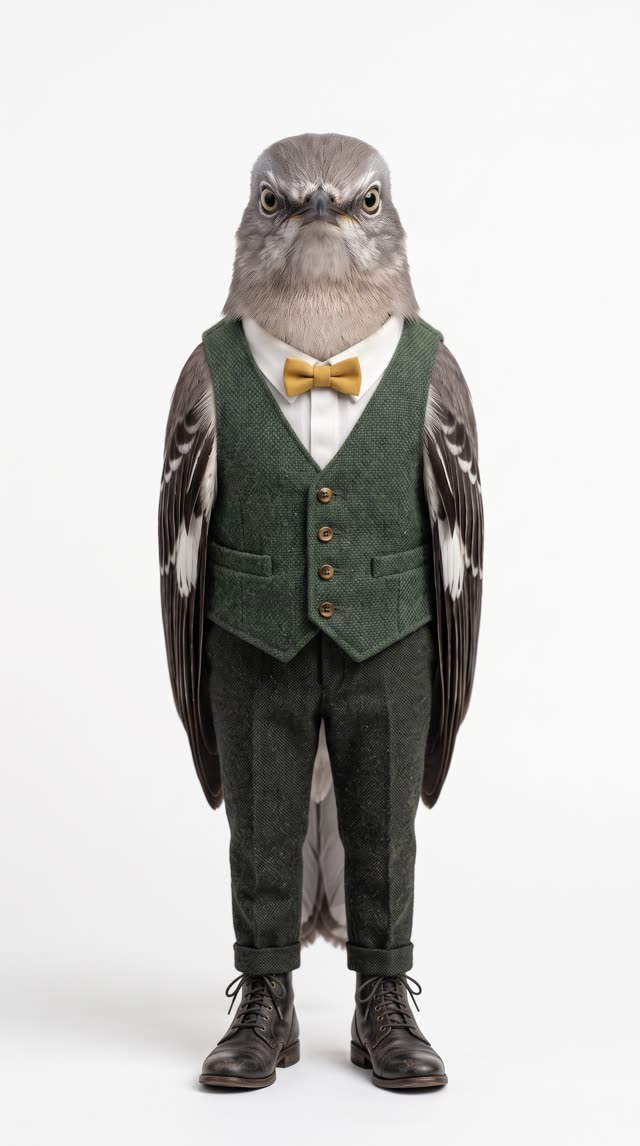
The face of Mockingbird
Meet Nesta Blythe
botanical archivist in Auckland
Nesta catalogs heritage seeds for a living and keeps the minutes for her rooftop community greenhouse. Like every mockingbird, she repeats back exactly what was said, and files it where it can't expire.
If your notes vanish when you stop paying, they were never your notes.
Mockingbird is named after the mockingbird, which repeats what it hears. Nesta is a fictional character we made with ppl.studio, not a customer.
Waitlist open · Mockingbird
Get Mockingbird first
We build the dupes people sign up for first. Join and you'll get one email, the day Mockingbird is ready.
$504 Granola Business, 3 years$99 once
- Just your email: no card, no account
- One email when it ships, nothing else
- Planned price $99, once
Free
Build Mockingbird yourself
Paste this into Claude Code in an empty folder. It builds the core of Mockingbird in steps and stops after each one so you can try it.
- Built withSwift / SwiftUI · ScreenCaptureKit · whisper.cpp · Claude API · Markdown files
- You needClaude Code · an Anthropic API key
- Not includedThe full spec, polish, updates
Build me a macOS app called Mockingbird: a private AI meeting notepad.

What it does
- A menu-bar app. Start records my microphone and the system audio (the other people on the call). No bot joins the meeting.
- It transcribes on this Mac with whisper.cpp and streams the transcript into a side pane while we talk.
- Next to the transcript is a plain notepad where I type rough notes during the meeting.
- Stop sends my notes and the transcript to the Claude API and writes enhanced notes: my bullets stay as the skeleton, expanded with what was actually said, then decisions, action items with owners, and open questions. My own words stay visibly distinct from the AI's additions.
- Every meeting is saved as a Markdown file in ~/Documents/Mockingbird/ named YYYY-MM-DD-title.md, with the transcript in a collapsed section at the bottom. No cloud, no account.

Tech
- Swift and SwiftUI, macOS 14 or later. System audio through ScreenCaptureKit (audio only), the mic through AVAudioEngine, mixed to 16 kHz mono for whisper.
- whisper.cpp as a Swift package. Download the model on first run with a progress bar; base.en by default, switchable in Settings.
- The Claude API key lives in the Keychain and is set in Settings. Use the latest Sonnet model.

How to work
Build it in four steps and stop after each so I can try it: 1) record and save a WAV, 2) live transcription, 3) the notepad and saving, 4) the enhanced notes. After each step tell me exactly how to run and test it.

Brand
- The app's mascot is Nesta Blythe, a northern mockingbird in a forest-green tweed waistcoat and a mustard bow tie. Use her portrait (https://dupe.software/characters/mockingbird-icon.jpg) as the app icon, and her full-length picture (https://dupe.software/characters/mockingbird.jpg) on the first-run and empty screens.
- Write every label and message in her voice: deliberate, unhurried and calm. Nesta would say: "If your notes vanish when you stop paying, they were never your notes."
All of their plans
What Granola costs
From Granola's pricing page, per person, checked 2026-10-12.
| Plan | Billing | Per month | 3 years | Catch |
|---|---|---|---|---|
| Granola Basic | monthly | $0 | $0 | 30 days of meeting history |
| Granola Business | monthly | $14 | $504 | unlimited history, integrations, API |
| Granola Enterprise | monthly | $35 | $1,260 | SSO, admin controls |
| Mockingbird | once | — | $99 | planned price, plus your own AI usage |
Not sold on a dupe?
Other Granola alternatives
Mockingbird isn't for everyone. These do the same job in other ways: free plans, open source, teams, other platforms. Prices from their own pricing pages, checked Oct 12, 2026.
Otter.ai
Transcribes meetings live, with a bot that joins Zoom, Meet and Teams calls.
Free plan: 300 min/month, 30 min per conversation.
Otter.ai alternativeFathom
Recording every Zoom, Meet or Teams call free, with no monthly cap
Free plan: Unlimited recordings; AI action items and chat are limited. The catch: Bot-free recording is Mac-only beta; on Windows a bot joins your calls. Runs on Mac, Windows, Web (Zoom, Meet, Teams).
Fireflies.ai
Mixed Windows, Mac and phone users who want one searchable meeting archive
Free plan: 400 minutes of storage per team; limited AI summaries. The catch: Free plan stores only 400 minutes; recording video needs a paid plan. Runs on Mac, Windows, iPhone, Android, Web.
Jamie
Windows users wanting bot-free notes, with data hosted in the EU
Free plan: 10 AI notes a month, meetings capped at 30 minutes. The catch: Plus caps you at 20 meetings a month; unlimited is Pro at $55. Runs on Mac, Windows, iPhone. Price from Jamie's billing docs (its pricing page shows euros only).
Krisp
Bot-free notes plus noise cancellation for calls in noisy rooms
The catch: No free plan, just a 7-day trial; paying monthly doubles the price. Runs on Mac, Windows, iPhone, Android, Chrome.
Meetily
Keeping recordings and transcripts entirely on your own Windows or Mac computer
Free plan: Community edition free with no usage caps; no speaker labels. The catch: Free edition doesn't label speakers; Linux users must build it themselves. Runs on Mac, Windows, Linux (build from source).
Anarlog (formerly Hyprnote)
Open-source Granola-style notepad that runs locally, including on Linux
Free plan: Free with on-device models or your own API keys. The catch: Free plan needs your own AI keys for summaries; Windows, Linux still beta. Runs on Mac, Windows (beta), Linux (beta).
We don't earn anything from these links, and none of these companies is affiliated with dupe.software. Seen a price change? Tell us. How we research these pages.
Leaving Granola?
Take your Granola data with you
Whatever you switch to, export first, then cancel. From Granola's own help center, checked Oct 12, 2026.
1 · Export
Export your Granola data
- In the Granola desktop app, click your workspace name (bottom-left), go to Settings > Profile, click Generate CSV and choose the workspaces to include.
- Wait for the emailed link (usually within a few hours) and download the file within 24 hours, signed in to the same account.
- For a single note, use its ⋯ menu > Copy notes to copy the summary as Markdown; the copy icon in the transcript panel copies the transcript.
- On Business or Enterprise, an API key (Settings > Connectors > API keys) pulls notes, summaries and transcripts as JSON.
- FormatsBulk: a CSV of your notes. Granola's own docs disagree on whether it includes transcripts, so check your file. Single notes: Markdown. API: JSON (Business and Enterprise). No audio: Granola doesn't keep it.
- Watch outOne CSV export per 24 hours, and only notes you own that have a summary. Admins can't export the whole team's notes, and on Enterprise an admin has to turn export on.
2 · Cancel
Cancel Granola
- Click your workspace name (bottom-left) > Settings > Billing.
- Click Manage subscription to open the Stripe billing portal, then Cancel subscription.
Afterwards: Paid access lasts to the end of the billing period. Then the workspace moves to the free Basic plan, which shows only the last 30 days of notes. Older notes are kept, not deleted, and come back if you upgrade; the CSV export still covers your full history.
Source: docs.granola.aiQuestions
Granola alternative FAQ
Is Mockingbird a Granola clone?
It's an independent app that does the same job. We build it from our own spec, with no Granola code, design or branding, and we aren't affiliated with Granola.
When can I get Mockingbird?
Mockingbird is on the waitlist: we build the dupes people sign up for first. Join the waitlist and you'll hear the day it's ready, before anyone else.
What does the AI cost on top?
Mockingbird uses your own Claude API key, so you pay Anthropic directly for the text it sends: the transcript and your notes, once per meeting. Transcription runs on your Mac and costs nothing.
Is there a free alternative to Granola?
Granola's own free plan works if 30 days of history is enough. Otherwise, build Mockingbird yourself from the starter prompt on this page: it costs nothing but your time and API usage.
More dupes
Mockingbird also replaces
Mockingbird is an independent app, not affiliated with or endorsed by Granola. Granola is a trademark of its owner, named here only to describe what Mockingbird is an alternative to. All dupes.